


Google Search Console
Track weekly clicks, impressions, CTR, average position, and the top pages that gained or lost visibility.

WPMissionControl connects Google Search Console, Core Web Vitals, Lighthouse Mobile metrics, and website monitoring signals into one clear WordPress dashboard.
WPMissionControl brings together the sources that usually live in separate tools. Search visibility, real-user experience, synthetic performance checks, uptime, SSL, screenshots, and health events can be reviewed together instead of in isolated tabs.
Track weekly clicks, impressions, CTR, average position, and the top pages that gained or lost visibility.
Monitor LCP, CLS, INP, and user-experience status so performance changes are visible over time.
Use Lighthouse Mobile metrics as a fallback when field data is not available yet, keeping the performance card useful from day one.
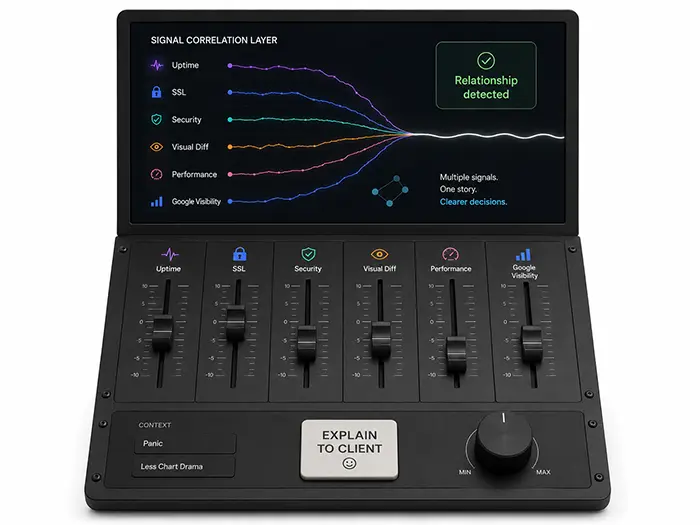
All collected data is visualized in performance graphs and can feed the Correlation Layer, where it merges with uptime, SSL, visual diff, and security signals.
These sample cards show how the integration data can look once connected: not empty placeholders, but useful signals that help teams decide what needs attention.
Performance and SEO problems rarely happen in a vacuum. Multiple integrations help you understand whether a traffic drop, ranking shift, or slow page is connected to a technical change on the WordPress site.
Add your WordPress site, connect the data sources you need, and review search visibility, performance, and technical signals together in WPMissionControl.
Short answers for site owners, agencies, and WordPress teams that want clearer visibility without opening several tools every week.
Bring search visibility, real-user experience, Lighthouse fallback data, and WPMissionControl monitoring together in one place.
WPMissionControl watches over your WordPress site day and night, tracking uptime, security, performance, and visual integrity.
AI detects and explains changes, warns about risks, and helps you stay one step ahead.
Your site stays safe, transparent, and under your control — 24/7.

Visual and performance context Visual Changes and Performance Metrics in the Same WordPress Workflow A page can change visually and technically at the same time. Integrated monitoring helps teams understand both sides. WordPress sites change often. Page builders update, blocks move, templates change, images are replaced, scripts are added, and content sections are redesigned. Those […]
Integration workflow How to Connect WordPress Monitoring Integrations Without Tool Overload The point of integrations is not to create more dashboards. It is to make the WordPress health story easier to understand. Tool overload happens when every data source becomes another place to check. Search Console, performance tools, uptime monitors, SSL checkers, screenshot tools, and […]
Revenue page monitoring Multiple Integrations for WooCommerce and Revenue Pages Stores, membership sites, and lead-generation pages need more than a homepage check. Revenue pages deserve connected visibility. WooCommerce stores and revenue-focused WordPress sites depend on product pages, checkout, account areas, pricing pages, booking forms, demo forms, and landing pages. If these pages slow down, disappear […]
Maintenance workflow How Maintenance Teams Use Integrated WordPress Monitoring Maintenance teams need a way to connect routine care with the search, performance, and reliability signals that show whether the site is healthy. WordPress maintenance includes updates, backups, security checks, uptime review, SSL monitoring, performance care, and issue response. Multiple integrations make that work easier to […]
WordPress integrations Why Multiple Integrations Matter for WordPress Monitoring A single metric rarely explains the whole story. Multiple integrations help WordPress teams connect search visibility, performance, uptime, and technical health. WordPress teams often open several tools to understand what is happening: one for Search Console data, another for Core Web Vitals, another for uptime, another […]
Search visibility Google Search Console and WordPress Monitoring in One Dashboard Search Console data becomes more actionable when it can be reviewed alongside uptime, performance, SSL, and site health events. Google Search Console is essential for understanding how a WordPress site appears in search. It can show clicks, impressions, average position, and page-level visibility. But […]
Core Web Vitals Core Web Vitals Monitoring for WordPress Teams Core Web Vitals help teams understand real user experience, but the data is stronger when connected to WordPress health signals. Core Web Vitals can reveal whether visitors are experiencing slow loading, delayed interaction, or layout instability. For WordPress teams, those signals can be affected by […]
Lighthouse fallback Why Lighthouse Mobile Metrics Are Useful When Real-User Data Is Limited Some WordPress sites do not always have enough real-user Core Web Vitals data, but teams still need performance visibility. Core Web Vitals field data is valuable, but it can be limited for low-traffic sites, new pages, campaign URLs, or pages without enough […]
Correlation layer How Correlation Helps Explain WordPress SEO and Performance Changes A metric can show that something changed. Correlation helps teams understand what may have changed at the same time. Performance and SEO problems rarely happen in isolation. A traffic drop might coincide with downtime, slow response times, a visual change, an SSL warning, a […]
Agency reporting Multiple Integrations for Better WordPress Client Reporting Agencies can explain WordPress performance, SEO, uptime, and technical health more clearly when the data lives in one place. Client reporting often becomes a collection of screenshots from different tools. One screen shows search data, another shows page speed, another shows uptime, and another shows technical […]