




Optimized for WordPress websites
30 Day Money-Back Guarantee
WPMissionControl Wordpress MONITORING PLUGINStart monitoring now
The WordPress Early-Warning System ThatExplains What`s Really Happening on Your Site
Monitor uptime, SSL, domain expiration, file integrity, malware signals, visual changes, performance, and WordPress health.
We turn complex signals into clear AI-powered explanations.
Free Plan Available - No Credit Card Required



Built forWordPress

Loved byAgencies

Useful forDevelopers

Perfect for One-SiteOwners

No Tech SkillsNeeded

Doesn’t Slow DownYour Site
WordPress Problems Often Begin Before Downtime
Most issues start small—then impact your site, your users, and your business.

Updates Break Things
Plugin or theme updates can unexpectedly break layouts and features.

SSL & Domain Expire
Expired SSL or domains cause trust warnings and lost visitors.

File Changes Happen
Unexpected file changes can indicate hacks or unwanted edits.

Suspicious Code
Hidden code or backdoors can go unnoticed for days or weeks.

Performance Drops
Slow sites hurt UX, conversions, and search rankings.

Visual Changes
Silent visual changes can harm trust and brand reputation.

PHP Errors & Login Conflicts
Plugin conflicts, PHP errors, or login failures can quietly block access and break important workflows.

Third-Party Failures
APIs, scripts, or external services can fail and affect key site functions.

SEO & Indexing Issues
Technical changes can block pages, break metadata, or hurt visibility in search.
Built for WordPress. Powered by AI.
A lightweight plugin collects signals, your dashboard brings them together, and AI explains what matters.
1. Plugin

WordPress Plugin
Lightweight plugin that collects health, integrity, and activity signals from your site.
2. Dashboard

Mission Control Dashboard
See alerts, checks, changes, and monitoring history in one clear control center.
3. AI Clarity

AI Explanations
AI turns technical signals into plain-English summaries, so you know what changed and why it matters.
How It Works
Get started in minutes and let WPMissionControl do the watching.
1

Install the Plugin
Add WPMissionControl to your WordPress site in just a few clicks.
2

Connect Your Site
Link your website to the dashboard and verify ownership.
3

Monitoring Starts
We continuously check uptime, security, integrity, and performance signals.
4

Get Clear Explanations
Receive alerts and AI-powered summaries that explain what changed and what to do next.
FEATURES
Power Monitoring. Zero Guesswork.
A full monitoring layer for WordPress websites — built to detect, connect, and explain the signals behind your site’s health.

WordPress Uptime Monitoring Plugin
Know when your site slows down, stops responding, or becomes unavailable before visitors notice.

WordPress SSL Monitoring
Track certificate status, HTTPS trust, and expiration dates before browser warnings appear.

WordPress Core Checksum Monitoring
Detect modified, missing, or unexpected WordPress core files and integrity changes.
WordPress Domain Expiration Monitor
Get early warnings before domain expiration causes downtime, lost access, or broken trust.

AI-Powered WordPress Malware Scanner
Find suspicious code patterns, risky PHP changes, and malware-like signals with AI-assisted explanations.

WordPress Trust Badge & Public Status Page
Show that your website is actively monitored with a badge and public status page.

WordPress Visual Diff Monitoring with AI
Compare screenshots, detect visual changes, and understand what shifted on your pages.

WordPress Monitoring Integrations
Connect Core Web Vitals, Google Search Console, and other signals into one health picture.

WordPress Monitoring Correlation Layer
Connect uptime, performance, visual, activity, and security signals into one clearer explanation.

Clear WPMC Behavior & Heatmap Insights
Turn aggregated visitor activity into clear engagement metrics, traffic-source insights, behavior opportunities, and AI-assisted recommendations.
NOTIFICATIONS & SUMMARIES
Alerts That Make Sense
Get notified when something matters — and understand what changed without digging through logs, charts, or technical noise.

Email Notifications
Stay informed with email updates that summarize uptime, performance, security, and health changes in one place.

SMS for Critical Issues
Receive instant SMS alerts for urgent problems, so you can react before clients or visitors notice.

Custom Alert Rules
Decide what is urgent, what can wait, and how each type of signal should reach you.

AI-Assisted Summaries
Get short explanations that highlight what changed, why it matters, and what deserves attention next.
No alert overload. Just the right context, delivered on your terms.
WPMISSIONCONTROL
Take a Closer Look at the Dashboard
See the core monitoring signals, health checks, scans, and trust indicators that keep your WordPress site visible, protected, and under control.
1
Uptime & Response
Monitor availability, response time, and uptime trends at a glance.
2
Health & API Status
See plugin connectivity, health points, and system status in one place.
3
AI Malware Scanner
Review suspicious findings and AI-assisted malware scan results.
Monitored websitewpmissioncare.com
Current statusUpLast checked5 mins agoHealth points21 good

StatusCurrent availability, response time, uptime history, and health points.
Uptime (31 days)

100%
Response time
7 days
MonTueWedThuFriSatSun
Uptime status
StatusUpManual checkjust nowLast scheduled5 mins agoNext runin 4 mins
Average response time
463 msPast 30 days (daily avg)Uptime graph

Last 30 days - no downtime incidents detected
Health points

Critical: 0Recommended: 4Good: 21
wpmissioncare.com health is stable and actively monitored.

SSL Certificate
Certificate validity, issuer details, and expiration.
ValidExpires in 83 days
Common name: wpmissioncare.com
Organisation: Google Trust Services
Signature algorithm: ECDSA-SHA256

Domain Name
Registration status, registrar information, and expiration.
Domain OKExpires in 56 days
Domain: wpmissioncare.com
Checked: 5 mins ago
Next run: in 5 hours
Issues
1 open
https://wpmissioncare.com/WordPress core files verifiedChecked 5 mins agoClosed
https://wpmissioncare.com/Health point requires reviewDetected 18 mins agoNew
4
Full Site Scan
Inspect file scan results, integrity changes, and flagged files.
5
Core Web Vitals & Integrations
Connect performance signals and external monitoring sources.
6
Trust & Communications
Track SSL, domain status, public badge, and reporting tools.
USE CASES, REPORTS & TRUST
Built for the People Behind WordPress Sites
From solo site owners to agencies and care professionals, WPMissionControl helps you monitor clearly, report confidently, and show trust publicly.

Who It’s For
Site Owners
See what matters on your website without learning technical monitoring tools.

Agencies
Monitor client sites and show the value of ongoing WordPress care.

WordPress Care Plans
Turn maintenance work into visible checks, summaries, and trust signals.

Developers
Catch file changes, performance shifts, and suspicious signals earlier.

WooCommerce Stores
Protect uptime, SSL, performance, and other revenue-critical site signals.

SEO / Marketing Teams
Stay aware of technical and performance changes that affect visibility and growth.
PRICING
Choose the Right Level of WordPress Monitoring
From essential uptime checks to AI-powered insight, WPMissionControl gives you the level of visibility your site actually needs.
Classic Monitoring

Free
Best for testing or small personal sites
Up to 3 websites
 Email alerts only · 1 contact
Free
- Uptime & SSL monitoring
- Health & file integrity checks
- Email alerts only
Most Popular

Professional
Best for growing websites and small teams
Up to 7 websites

 Email, Slack, and SMS
$9.98/ month
- All Free features
- Domain Expiry Alerts
- AI Malware Scan
- Slack / SMS Notifications
- Secure Website Badge

Agency
Best for client monitoring at scale
Up to 20 websites
Email, Slack, and SMS$44.98/ month
- All Professional features
- Up to 20 websites
- Multi-Contact Alerts
- Priority Tech Support
Plus Intelligence
AI-Powered

Professional Plus
Best for deeper AI-powered visibility
Up to 7 websites
Email, Slack, and SMS$99/ month
- Everything in Professional
- Visual diffs with AI analysis
- Smart correlation engine
- PDF reports for every host
- Core Web Vitals & GSC integrations
AI-Powered

Agency Plus
Best for agencies that need full-scale intelligence
Up to 20 websites
Email, Slack, and SMS$250/ month
- Everything in Professional Plus
- White-label reports & branding
- Account-level insights
- Extended team notifications
- Integration-ready architecture
How to get started with monitoring your websites in 3 easy steps
 WORDPRESS CHECKER
Check If Your Site Runs on WordPress
Enter your domain to see whether your website is built on WordPress - and what monitoring features you can unlock.
 LIVE NETWORK DATA
Live WordPress Monitoring Pulse
A real-time snapshot of uptime and response performance across WordPress sites monitored by WPMissionControl.
This pulse reflects average availability and response speed across monitored sites, continuously tracked and transparently measured.

Average Uptime
Percentage of time monitored sites were available during the measured period.

Average Response Time
1.02s
Average time it takes monitored websites to respond.
Continuously tracked. Transparently measured. Updated as monitoring data changes.
 Monitor what matters
Keep Your WordPress Site Visible, Protected, and Under Control
Your WordPress site changes all the time. Plugins update, files change, certificates expire, pages slow down, layouts shift, and security risks can appear quietly. WPMissionControl helps you monitor these signals before they turn into bigger problems.
With uptime monitoring, SSL checks, domain expiration alerts, file integrity monitoring, AI malware scanning, visual diff detection, Core Web Vitals insights, reports, status pages, and trust badges, WPMissionControl gives you a clearer view of your website's health. It is built for WordPress site owners, agencies, developers, WooCommerce stores, and care professionals who want monitoring that is easy to understand and practical to use.
Start with simple WordPress monitoring, upgrade when you need deeper AI-powered insight, and keep your site under control with alerts, summaries, and visibility that help you know what is happening - and what to check next.
Start Monitoring Now
 Trusted by WordPress professionals worldwide
Trusted by WordPress professionals worldwide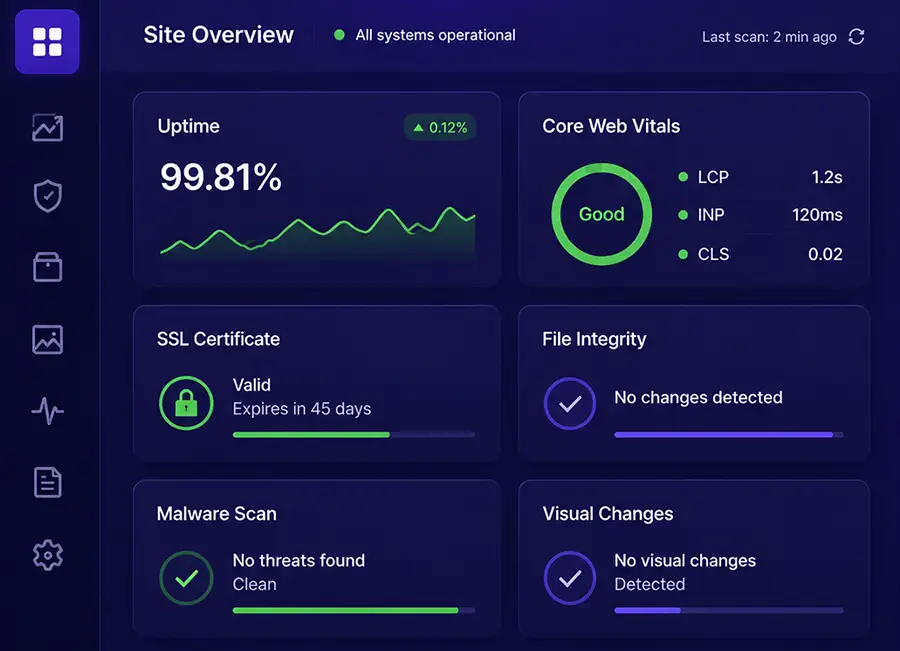
 Uptime Monitoring
 SSL & Domain Monitoring
 File Integrity & Malware Scanning
 Visual Changes Detection
 Performance Insights
 Reports, Alerts & Status PagesTrust Badges & TransparencyWhite-label Branding
Make monitoring feel like part of your service
Give clients a polished monitoring experience under your own identity. WPMissionControl lets you customize public website status pages and client PDF reports with your logo, brand color, navigation, and footer.
It is built for agencies, freelancers, and WordPress care teams that want to communicate clearly, strengthen client trust, and make the ongoing value of maintenance visible.
WordPress agenciesCare plan teamsFreelancersAPAgency Partner
Website status
wpmissioncare.com
✓
All systems operationalYour website is online and monitored
AvailabilityOnline now
30-day uptime100%
SSL statusProtected
Reliability over timeLast 30 days

Your identity, front and center
Apply your logo and primary brand color to every client-facing status page.

A useful client destination
Add links to your website, support portal, services, or other client resources.

Professional reporting
Carry your branding into clear PDF reports that demonstrate the value of your work.
New featureAvailable on Professional Plus & Agency Plus
Behavior Intelligence Agent for WPMC Behavior & Heatmap
Understand what visitors do after your website loads. See which pages hold attention, where people stop scrolling, and whether key calls to action receive the engagement they should.
Powered by the free WPMC Behavior & Heatmap plugin, WPMissionControl turns aggregated website activity into clear behavior insights, AI-assisted observations, practical opportunities, and recommended next actions.
7, 30, or 90 daysPractical reporting periodsPrivacy-consciousAggregated Dashboard insights

Connected with WPMC Behavior & Heatmap
The free WordPress plugin collects privacy-conscious, aggregated behavior signals. WPMissionControl organizes them into clear insights for faster decisions.
7 days30 days90 days
May 12 - June 102,847+18.4%
68.2%+9.6%
142+24.8%
2m 18s+11.2%
Behavior Intelligence AgentAggregated visitor activity / High confidence
AI assistedExecutive summary
Engagement improved during the selected period, but high-intent mobile visitors still interact with the primary service CTA less often than desktop visitors.
- Mobile visitors drive 71% of tracked pageviews.
- Average scroll depth increased to 68.2%.
- Google remains the strongest acquisition source.
- Move the primary value proposition and CTA higher.
- Review the mobile CTA layout on priority service pages.
- Compare channel engagement during the next 30 days.
Behavior OpportunityPriority page detected
High impactHigh traffic, limited CTA interaction/services/wordpress-care/
Pageviews684Avg. scroll74%CTA clicks8
Engagement context30 days
Top sourceGoogle Search46%
Search & Social TrafficVisits referred by major search engines and social networks.
2,348 visitsGoogleSearch
1,12639.6%
BingSearch
1846.5%
YahooSearch
732.6%
Facebook
42815.0%
Instagram
31611.1%
LinkedIn
2217.8%
Understand
See what holds attention
Review sessions, scroll depth, time on page, CTA clicks, and device mix in one clear view.
Prioritize
Find pages worth improving
Surface high-traffic pages where visitors leave early or miss the actions that matter.
Act
Turn patterns into next steps
Use AI-assisted observations and focused recommendations to guide content and conversion work.
Performance-first monitoring
Powerful observation. Zero disruption.
Monitoring should never become another reason your website feels slow. WPMissionControl is designed to observe without competing with visitors, conversions, or the work your pages need to do.
Core checks run on our infrastructure outside your website, while lightweight WordPress signals are handled asynchronously. Your critical rendering path stays clean, and Google PageSpeed remains focused on the experience you built.
0 msCore monitoring added to the critical render pathExternalMonitoring infrastructureAlways onClean, continuous observation
Live observation pathYour website stays fast and focused
CleanVisitor experienceFast page deliveryContent, interactions, and conversions stay first.
PageSpeed-ready100%render path reserved for your site
Outside the critical pathFast, asynchronous, and clean

WPMissionControl CloudExternal checksUptime · SSL · Domain · Performance
LiveWordPress signal layerAsync observationSmall signals · Batched delivery
QuietBlocking requestsNone from core monitoringVisitor experienceProtectedMonitoring clarityAlways available
Observed from the outside
Uptime, SSL, domain, performance, and availability checks run on WPMissionControl infrastructure, not inside the visitor request.

Signals sent asynchronously
Lightweight WordPress signals are collected and transferred without holding up the page's critical rendering path.
PageSpeed stays focused
Google PageSpeed measures your website experience, while monitoring remains clean, quiet, and out of the way.
FAQ
Frequently Asked Questions
Yes. WPMissionControl does not replace Wordfence, Sucuri, or other WordPress security plugins and website security services. It works alongside them and adds an external WordPress monitoring layer.
UptimeRobot, Jetpack Monitor, and similar uptime monitoring tools usually check whether your website responds. That is useful, but uptime is only one part of WordPress website health.
WPMissionControl collects and correlates data from 11+ independent website and WordPress monitoring sources, including uptime, SSL, domain status, file integrity, performance, activity logs, and more.
WPMissionControl is a subscription because continuous WordPress monitoring requires real infrastructure, storage, bandwidth, and processing power.
Yes. To enable full WordPress monitoring, you install the WPMissionControl plugin and enter your API key.
 Final step
The signals are already there. Start seeing them.
WPMissionControl helps you monitor what matters across your WordPress sites - clearly, continuously, and before issues become visible to everyone else.
 Up to 3 websites free. No credit card required.Real-time MonitoringInstant AlertsProactive Protection
 Actionable Insights